Viewing and rebuilding remittance information
Whether you use the standard remittance information template or a custom one, you can view the remittance details in either the payment journal or on the Payment Suggestion Card. This article describes how to view and edit remittance information.
For more information about adding a custom remittance template, see Creating a Remittance Information Template.
For more information about configuring remittance information, see Configuring remittance information.
To view remittance information in the payment journal
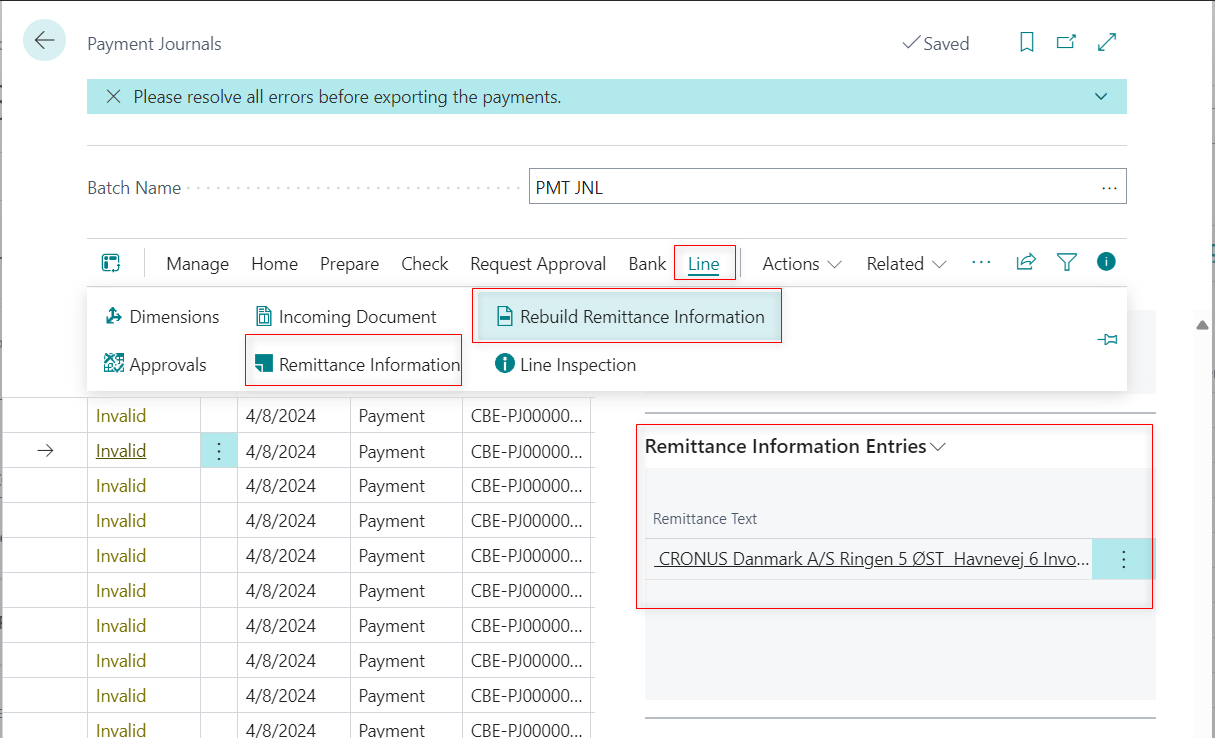
To view remittance information on a journal line:
- On the Payment Journals page, select the relevant line.
- Go to Line > Remittance Information to access the details.
Alternatively, you can view the Remittance Information Entries in the right panel. On the Remittance Information Entries page, you have the option to edit the list.
To rebuild remittance information in the payment journal
You may need to update the remittance information on a line after modifying the remittance information template.
To rebuild remittance information:
- On the Payment Journals page, select the line and go to Line > Rebuild Remittance Information.
- You can now choose to select the line only or all lines. Select OK to proceed.
To view remittance information on the payment suggestion card
To view remittance information on the Payment Suggestion Card:
- On the Payment Suggestion Card, click Actions > Remittance Information
- On the Remittance Information Entries page, you can edit the list and rebuild the remittance entries.